
MS-Excel Templates
Lead Staff Rostering and Duty Scheduling Excel template

- SKU:
- MW073
- Availability:
- Downloadable immediately




Description
Lean Staff Rostering and Duty Scheduling Excel template
Easily create and simplify your Staff Roster and Duty Scheduling while efficiently managing your staff shifts and schedules with our highly flexible and user-friendly Excel XLS template!
A Customizable Employee Rostering Solution Template for any Business
Create Weekly Staff Rosters in Minutes
Say goodbye to the headaches of manually creating and managing staff rosters.
The Lean Staff Rostering & Duty Scheduling Template helps managers quickly create professional weekly staff rosters while ensuring every shift has the right number of employees in each role.
Designed for small and medium-sized businesses, this Excel template is suitable for restaurants, cafés, hotels, retail stores, healthcare providers, offices, leisure facilities and many other businesses that roster staff in different roles.
It allows you to readily schedule up to 30 employees across 10 different roles, over 7 days, each of which can easily be modified to meet your needs.
Designed for the business manager rather than the Excel technical user, we have designed our Excel template to utilize only standard Excel features, no complex technical features or macros. If you have Excel, you are ready to go!
Setting up and using our template is quick and easy. With our comprehensive User Guide and outstanding customer service and support (see what our customers say), we are here to assist you every step of the way.
We back up this with a No Quibble Money Back Guarantee
Visualize Your Roster at a Glance
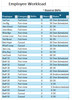
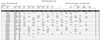
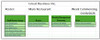
Each role/job is color coded to allow you to see the schedule at a glance and quickly identify shifts that are over or under rostered for any role and make necessary adjustments with quickly and easily. You can also see how many shifts each employee is rostered for during the week.
Convenient Printing and Distribution Options
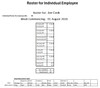
You can print copies of the full roster and individual employee schedules or opt for electronic distribution. Simply choose the method that works best for your business operations.
No Macros, Just Simplicity
We have designed our Excel template to focus on the needs of the business manager, rather than the Excel technical user, eliminating any need for complex technical features or macros and ensures a hassle-free experience without compromising functionality.
Get Started Today!
With our comprehensive User Guide and outstanding customer service and support (see what our customers say), we are here to assist you every step of the way.
If you have Excel, you are ready to go!!
We back up our exceptional offering with a No Quibble Money Back Guarantee
Excel Staff Rostering Key Features
- Suitable for any business that has a staff shift/roster system across two shifts.
- Seven-day roster supports up to 30 employees, across 10 different roles, which can be easily modified
- Roster colour coded to see the roster at a glance
- Management summary showing each employee’s workload
- Automatic comparison of required staffing versus actual staffing highlighting understaffed, overstaffed shifts
- Professional print-ready roster which can be printed or distributed electronically
- Individual employee roster printed or distributed electronically
- Fully customizable Excel template
- Uses only standard Excel features, no macros or VBA
- Simple to setup – if you have Excel, you are ready to go!
- Flexible shift definitions with start and finish times
- Comprehensive User Guide
- Outstanding customer service and support -- just check out what our customers say.
- No Quibble Money Back Guarantee
Similar Products
You may also want to check out
- Printable Monthly Calendar
- Staff Leave Planning and Scheduling Management Excel Template
- Timesheet 1-, 2- & 4-week versions templates Excel
- Monthly timesheet templates Excel
Need Something Different
If the features of the Staff Rostering Excel template are not exactly what you need, please contact us and we will see if we can meet your needs.
Why Choose This Template?
Unlike many complex scheduling systems, this template focuses on the features managers actually need every week:
- Build rosters quickly
- Monitor employee workloads
- Check staffing levels
- Print professional schedules
- Adapt the workbook as your business changes
Simple to use. Easy to customise. Built for everyday business management
No Quibble Guarantee
Check out the Staff Rostering Excel Template User Guide for full details of the comprehensive list of features and the ease-of-use facilities that allow you to get started right away. Still not sure if it right for you, all our products come with a NO QUIBBLE MONEY BACK GUARANTEE
Security and Payment
The site is fully protected using the industry leading Geo-Trust SSL system.
Payments via all major credit cards, Apple Pay and Google Pay are processed using Stripe payment processing and we also accept PayPal payments.
Once payment is processed, the items purchased can be downloaded immediately.



Related Products
Related Products

Manpower/staffing Planning and Budgeting Excel (XLS) Template
MS-Excel Templates
- SKU:
- MW006
- Availability:
- Downloadable immediately

Annual staff leave planner for 2026 (and any future year) Excel Template
MS-Excel Templates
- SKU:
- MW042
- Availability:
- Downloadable immediately
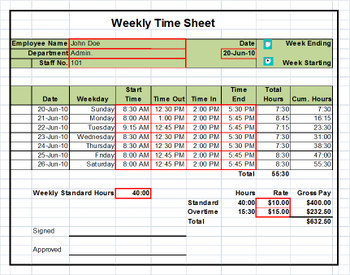
Timesheet Excel Templates: 1 week, 2 Weeks and Monthly Versions
MS-Excel Templates
- SKU:
- MW003
- Availability:
- Downloadable immediately